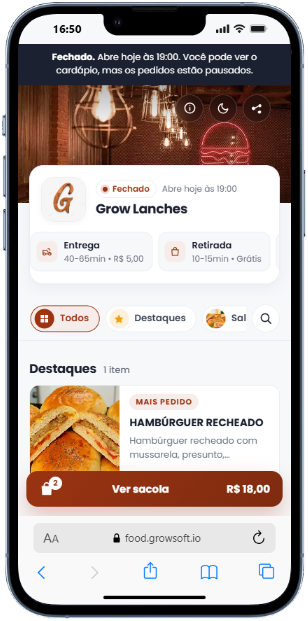
Menu
Categories, products, photo, price and a featured item. Pause an item without deleting it.


For restaurants
Build categories and products, share the menu link and receive the order on the store WhatsApp.
Sign-up is free. It takes less than a minute. No credit card.
How it works
Categories and products, with a photo, description, price and a featured item. Pause anything that runs out.
The customer opens the menu with the store logo, cover, slogan and light or dark appearance.
On the Free plan, the order arrives organized on the store WhatsApp.
The panel
Free opens the public menu and WhatsApp orders. Premium unlocks the operation inside the panel.
Categories, products, photo, price and a featured item. Pause an item without deleting it.
Search by code, customer or phone. Delivery, pickup or dine-in, as a list or a kanban.
The kitchen follows what came in. With online card payment, the order moves on only after it is paid.
The business numbers stay in the panel.
On Free, the order goes to the store WhatsApp. The WhatsApp area inside the panel is part of Premium.
Identity, hours, delivery and payment in one place.
My store
Name, WhatsApp with country and area code, slogan, description, logo, cover and Instagram. The menu can be light or dark. The theme color is part of Premium.
The store opens and closes on its own. Outside those hours the customer still sees the menu, but cannot order. A shift can run past midnight, such as 18:00 to 02:00.
Delivery, pickup and dine-in. Address, fee, minimum order and the delivery or pickup time.
Pix, credit, debit, meal voucher and cash, with change. On Free, the customer copies the Pix key. On Premium, Pix is a QR code with the order amount. For credit and debit, the store can offer pay now with Mercado Pago.
Plans
To get started: an online menu with orders on WhatsApp.
To run the store: orders in the panel, the kitchen and the business numbers.
Sign-up is free and does not ask for a card. The Premium price appears only when you subscribe, inside the panel.
Sign-up is free. It asks for your name, the restaurant, WhatsApp with an area code, email and a password.